

If you are starting a career in data analytics, the Power BI vs Tableau question is probably the first tool decision you will face — and it confuses almost every beginner. Both tools turn raw data into dashboards, both appear in job descriptions, and both have loyal fans who insist their tool is the only right choice. The truth is simpler: neither tool is “better” in the abstract. The better tool is the one that matches your laptop, your budget, your current skills, and the jobs you are targeting.
Quick verdict: Learn Power BI first if you already know Excel, work on Windows, and want the fastest, cheapest route to a data analyst job — that covers most beginners in India. Learn Tableau first if you use a Mac, love visual design and exploration, or are targeting companies known to run on Tableau (especially Salesforce-heavy organisations). And if you are still unsure, learn Power BI first and add Tableau later — the underlying concepts transfer almost completely.
This guide compares the two tools the way a learner actually needs: learning curve, real cost, free versions, job relevance in India, and a week-by-week roadmap for whichever you pick. No enterprise jargon, no licence-sales pitch — just an honest answer to “which one should I learn first?”
What Is Power BI?
Power BI is Microsoft’s business intelligence (BI) tool. You connect it to data — Excel files, SQL databases, cloud apps — clean the data, build a data model, and create interactive reports and dashboards that others can view in a browser or mobile app. Because it comes from Microsoft, it fits naturally into the Office ecosystem most companies already use.
Its workflow is structured: you model your data first, then visualise it, then publish a dashboard. As one comparison on Medium puts it, in Power BI the designer largely controls the story the dashboard tells. For learners, the biggest attractions are that Power BI Desktop — the full report-building app — is completely free for personal use, and that anyone comfortable with Excel formulas will find its interface familiar. Its formula language, DAX, is where the real power (and the real learning curve) lives.
What Is Tableau?
Tableau, owned by Salesforce, is the older and more design-focused of the two. It built its reputation on beautiful, highly customisable visualisations and drag-and-drop exploration: you load data, start dragging fields onto shelves, and discover patterns as you go. Where Power BI is structured, Tableau is exploratory — fields are classified upfront as Dimensions (categories) and Measures (numbers), and the user explores the story interactively.
Tableau is loved by analysts who think visually and by companies that prize dashboard polish — geographic maps and custom chart types are long-standing Tableau strengths. Its free tier, Tableau Public, is free to use but comes with a serious catch for learners: everything you create on Tableau Public is published publicly. There is no private mode. That is fine for a portfolio, but awkward for practice projects with real-looking data.
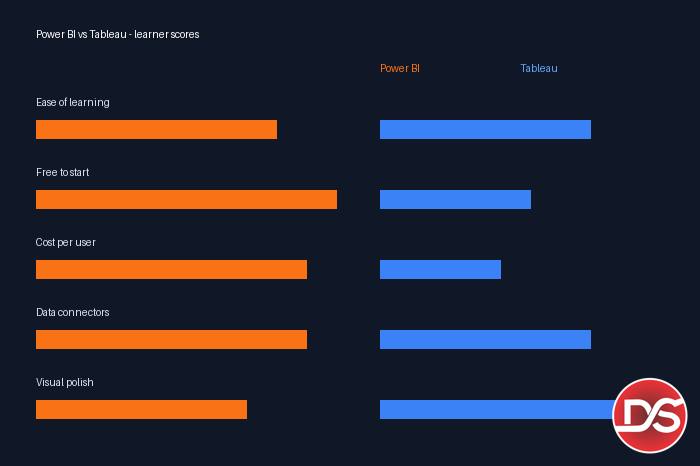
Power BI vs Tableau: Head-to-Head Comparison
The table below compares both tools on the factors that actually matter to a learner in 2027. Figures are as reported by recent published comparisons of the two platforms.
| Factor | Power BI | Tableau |
|---|---|---|
| Ease of learning | Gentle for Excel users; familiar ribbon interface. Advanced DAX (row/filter context) is the hard part. | Steeper initially, but rewards visual thinkers; drag-and-drop exploration feels natural once the basics click. |
| Cost (paid plans) | Cheaper per user. Power BI Pro is around $14 per user/month (billed annually; prices change — check Microsoft’s official page). | Notably more expensive per user. The Creator licence — the one that builds reports — costs several times more per user/month than Power BI Pro. |
| Free version | Power BI Desktop is fully free for individuals — build unlimited private reports on your own machine. | Tableau Public is free, but every workbook you save is public. No private free tier. |
| Data connectors | 200+ native connectors; strongest with SQL Server, Azure, SharePoint, Dynamics 365, Excel. | 100+ connectors; strongest with Salesforce, AWS (Redshift, S3) and Google BigQuery. |
| Calculations | DAX — more verbose, but more powerful for complex business logic and time-intelligence. | Calculated fields and LOD (Level of Detail) expressions — generally simpler and easier to understand than DAX. |
| Data preparation | Power Query built in — the same tool Excel users already know. | Built-in prep is basic; serious cleaning needs the separate Tableau Prep product. |
| Mac support | Power BI Desktop is Windows-only. Mac users work through the web-based Power BI Service. | Tableau Desktop runs natively on both Windows and Mac. |
| Excel / Microsoft ecosystem | Deep, native integration — Excel, Teams, SharePoint, Azure, OneDrive. | Connects to Excel files, but sits in the Salesforce/AWS/Google ecosystem instead. |
| Visualisation | Strong defaults plus a marketplace of 400+ certified custom visuals; supports paginated reports. | Best-in-class custom visualisation flexibility, maps and dashboard polish. |
| AI features | Copilot (built on Azure OpenAI) can draft reports and write DAX from natural language. | Tableau Pulse for AI-generated insights, plus Tableau Agent / Einstein AI features. |
| Best for | Beginners, Excel-heavy workplaces, Microsoft-stack companies, budget-conscious learners. | Visual storytellers, Mac users, Salesforce/AWS companies, design-led dashboards. |
Two rows deserve a closer look. The connector gap — 200+ native connectors in Power BI versus 100+ in Tableau, as reported in published comparisons — sounds huge, but for a learner it barely matters: both tools connect to Excel, CSV, SQL Server, MySQL and Google Sheets, which covers nearly all beginner and fresher work. Where the gap shows up is ecosystem depth. Power BI plugs deepest into Microsoft and Azure data sources, while Tableau is strongest where Salesforce, AWS and Google BigQuery data lives. In practice, this means your employer’s existing software stack quietly makes this decision for most working analysts — one more reason to learn concepts, not just clicks.
Read the table as a learner, not as a company buying licences. The rows that decide YOUR first tool are the free version, Mac support, and ease of learning — not enterprise pricing. On those three rows, Power BI wins for most beginners: it is fully free to learn privately, and if you know Excel you will feel at home on day one. Tableau’s clearest learner advantages are native Mac support and a more forgiving calculation language.
DSSD Value Pick: Learn BI Tools Inside a Structured Data Analytics Course
Here is the part most comparison articles skip: the tool is only about 30% of what makes a fresher employable. Employers do not hire “Power BI users” — they hire data analysts who can clean messy data, write SQL queries, model data properly, and then present it in a BI tool. Watching random tutorials tool-by-tool often leaves gaps in exactly those foundations, which is why so many self-taught learners can build a chart but struggle in interviews.
That is why, for most learners in Delhi, our value pick is to learn BI tools as part of a complete data analytics course rather than in isolation. At DSSD (Delhi School of Skill Development, Rohini), the Data Analytics course teaches the stack in the order employers actually use it — Excel and SQL foundations first, then BI tools with live projects, so your dashboards sit on correctly cleaned and modelled data. You build portfolio projects on real-style datasets instead of copying tutorial dashboards, and the same concepts carry over whether your first job uses Power BI or Tableau.
For the current fee and batch schedule, please contact DSSD directly — course fees and schedules are updated periodically, and we would rather you get the exact current figure than quote one here that may go stale. If you are comparing courses, also read our guide on data analytics vs data science to make sure you are picking the right career track before you pick a tool.
Which Should You Learn First? It Depends on Your Career Goal
Since both tools are legitimate, the smartest way to decide is by the job you want. Here is the goal-by-goal breakdown we give our own students.
If you are a data analyst fresher
Learn Power BI first. In India, the bulk of entry-level analyst openings sit in IT services, consulting, BFSI and mid-size companies — environments that overwhelmingly run on Microsoft tools and Excel-heavy workflows. A practical pattern you will see again and again: Indian services and IT companies frequently standardise on Power BI because it ships with the Microsoft stack they already pay for, and hiring managers know a Power BI fresher can also handle Excel reporting from day one. Power BI Desktop being fully free also means you can practise privately and build a portfolio without spending anything. Pair it with strong Excel and SQL, check what the typical data analyst salary in India looks like at each level, and you have the most reliable fresher combination.
If you want to become a BI developer
Learn Power BI deeply first — including DAX, data modelling, row-level security and report optimisation — because dedicated BI developer roles skew heavily toward Microsoft-stack employers. Then add Tableau as your second tool. BI developers who can work in both tools are noticeably more flexible in the job market, and once your modelling concepts are solid, Tableau’s interface takes weeks, not months, to pick up. Browse current data analyst jobs in Delhi listings and you will see this Power BI-first pattern repeated in requirement after requirement.
If you are a freelancer or consultant
Learn the tool your target clients use — and ask them before you start. Small businesses and startups that live in Excel and Microsoft 365 usually want Power BI. Clients on Salesforce or US-based product companies more often ask for Tableau. Since freelancers are paid per deliverable, knowing both tools eventually doubles your addressable market; start with whichever your first two or three target clients mention, and learn the second one on live projects.
If your long-term goal is data science
Treat the BI tool as a supporting skill, not the main event. Learn Power BI to a working level — enough to present your analysis professionally — because it pairs with Excel and SQL, the two skills every data role expects. Then invest your serious hours in Python and statistics. Between the tools themselves, Tableau’s exploratory style is closer to how data scientists poke at data, but neither tool substitutes for programming skills on a data science path.
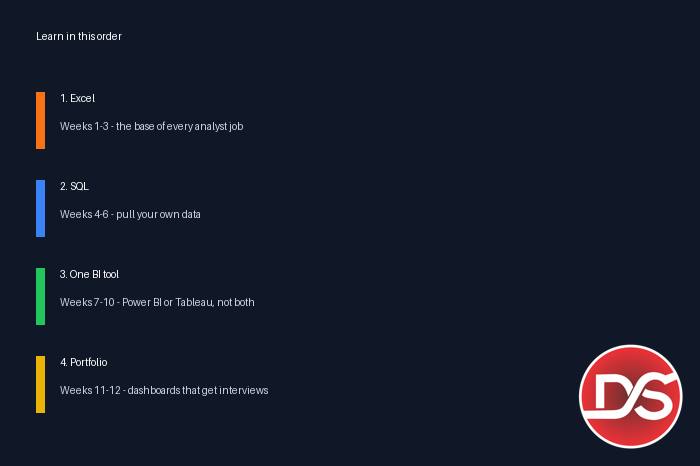
A Realistic Learning Roadmap (Whichever Tool You Pick)
The order matters more than the tool. This is the sequence that works for most beginners, with a realistic study-plan timeline assuming roughly 1–2 focused hours a day. Treat it as a study plan, not a promise — your pace depends on your starting point and consistency.
Weeks 1–3: Excel first. Pivot tables, XLOOKUP/VLOOKUP, conditional formatting, basic charts, and Power Query for cleaning data. Excel is not optional: it is the daily tool of most analyst jobs and the foundation both BI tools build on. If your Excel is shaky, everything after this step gets harder.
Weeks 4–6: SQL basics. SELECT, WHERE, JOIN, GROUP BY, aggregations and subqueries. Almost every real dashboard pulls from a database, and interviewers test SQL before they test dashboards. Free practice platforms and community resources make this very achievable on a budget — organisations such as the FSD Foundation also support skill-development initiatives that help learners from modest backgrounds access structured training, so explore foundation-backed and community programs in your area if cost is a barrier.
Weeks 7–10: Your first BI tool. If you followed the verdict above, this is Power BI for most learners: connect data, clean it in Power Query, build a simple star-schema model, create 8–10 core visuals, then learn DAX measures step by step. Published comparisons note that with proper training, most users become productive in Power BI within 1–2 weeks of guided practice — your first presentable dashboard by week 8–9 is a realistic target. Tableau learners: spend these weeks on connections, Dimensions vs Measures, core chart types, filters, and your first calculated fields and LOD expressions.
Weeks 11–12: Portfolio projects. Build two complete dashboards end to end — for example a sales analysis and an HR or finance analysis — using public datasets. Publish them (Tableau Public is perfect for Tableau learners; Power BI learners can share screenshots, files, or a free web publish where appropriate) and write two or three lines explaining the insight each dashboard reveals. Recruiters hire portfolios, not course certificates alone.
After month 3: The second tool. Now add the other BI tool at a working level. Because the concepts — models, measures, filters, visual best practices — transfer, this takes a few weeks of evenings rather than another full course.
One more practical note on the timeline: the 12 weeks above assume you are starting from basic computer comfort. If you already work with Excel daily — say, in an accounts, operations or MIS role — you can compress the first two stages into about three weeks combined and reach your first BI dashboard sooner. If you are a complete beginner to spreadsheets, add two to three weeks at the Excel stage instead of rushing it. Either way, protect the order: Excel, then SQL, then the BI tool. Every shortcut that skips the foundations shows up later as slower progress and weaker interview performance.
Can You Learn Both Power BI and Tableau? Should You?
Yes, you can — and eventually you probably should. But sequence beats simultaneity. Learning both at the same time as a beginner splits your practice hours and muddles two different calculation languages (DAX vs LOD expressions) before either becomes habit. The professionals who know both almost always learned them one at a time: deep in the first, working-level in the second.
A good rule: go deep enough in your first tool to build a dashboard from a raw, messy dataset without following a tutorial. When you can do that, you understand BI itself, not just one interface — and the second tool becomes a translation exercise. By the end of your first year as an analyst, having both tools on your resume is a genuine advantage, especially if you switch employers or move into consulting.
Common Beginner Mistakes When Choosing a BI Tool
Choosing by salary rumours. You will hear “Tableau pays more” or “Power BI pays more” depending on who you ask. Neither is true in isolation — pay follows the role, the company and your overall skill stack, not the logo on your dashboard tool. (More on this in the FAQs below.)
Skipping Excel and SQL. Jumping straight into a BI tool without Excel fluency and basic SQL is the single most common reason freshers stall. The tool is the presentation layer; the hiring tests happen underneath it.
Paying for licences you do not need. As a learner you should pay nothing for software. Power BI Desktop is free, Tableau Public is free, and paid licences are your future employer’s problem. If any course tells you to buy a licence to learn, walk away.
Tutorial-hopping without projects. Ten half-finished tutorial playlists teach less than two self-built dashboards. Finish projects; struggle is where the learning is.
Ignoring your own laptop. If you learn on a Mac, remember Power BI Desktop will not install on it — you will be working through the web service or a virtual machine, while Tableau runs natively. Check this before you commit to a sequence, not after.
Bottom Line
Start with a structured foundation: at DSSD in Rohini, Delhi, the Data Analytics course builds your Excel and SQL base first and then trains you on BI tools with live projects — the exact order this guide recommends — so you are employable whichever tool your first employer uses. Contact DSSD for the current fee and schedule, and if possible, sit in on a session before you decide.
On the tool question itself: for most beginners in India — Windows users, Excel users, fresher job-seekers — Power BI is the best first tool: free to learn privately, gentler if you know Excel, and aligned with the Microsoft-heavy workplaces that hire the most freshers. Choose Tableau first if you are a Mac user, a design-led thinker, or targeting Salesforce-ecosystem companies. Either way, learn one deeply, build real projects, and add the second tool within your first year. The tool will not make your career — the analyst skills underneath it will.
Frequently Asked Questions
